Introduction
Debugging is one of the most critical skills every programmer must master. No matter how carefully we write code, bugs are inevitable. Debugging is not just about fixing mistakes; it’s about understanding the flow of your program, improving the logic, and ensuring that your software behaves as expected.
Programming is a creative yet challenging process, and bugs are an inevitable part of it. For those just starting their coding journey, learning effective debugging techniques for beginners can make all the difference. These techniques help identify issues quickly, improve problem-solving skills, and build confidence while writing cleaner code. In this blog, we’ll walk you through some of the most practical and easy-to-learn debugging techniques for beginners that every aspiring programmer should know.
In this blog, you will learn what debugging is, types of errors, and the most effective techniques you can use to debug your code efficiently.
en.wikipedia.org/wiki/Debugging
What is Debugging?
Debugging is the process of identifying, analyzing, and resolving errors or bugs in the code. It involves using different tools and strategies to trace and eliminate problems so the program runs smoothly.
Debugging is the process of identifying, analyzing, and fixing errors or bugs in a computer program. It plays a crucial role in software development, ensuring that the code functions as expected. For those who are new to programming, understanding the basics of debugging is a must. This is where debugging techniques for beginners come into play — they offer simple, effective methods to find and resolve issues without getting overwhelmed. By learning these debugging techniques for beginners, newcomers can improve the accuracy of their code and develop a strong foundation for tackling more complex problems in the future.
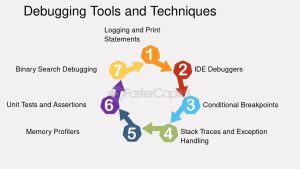
7 Best Debugging Techniques in python
1. Use Print/Log Statements
Use print() or log() statements to track the values of variables and the flow of the program at different stages.
Example (Python):
2. Use a Debugger Tool
Most IDEs like VS Code, PyCharm, Eclipse, etc., come with built-in debuggers. You can set breakpoints and go step-by-step through your code to inspect variables and flow.
Tip: Use the “Watch” and “Call Stack” sections in your debugger to understand what’s happening.
3. Break the Code into Smaller Parts (Modularization)
Divide your code into small functions or modules and test them individually. This makes identifying the faulty part easier.
Example: Test a function separately before integrating it into the main code.
4. Rubber Duck Debugging
Explain your code line-by-line to someone else (or even to a toy like a rubber duck!). Explaining helps you discover logical errors on your own.
Why it works: Teaching forces you to think clearly, which exposes hidden bugs.
5. Use Version Control (Git)
Always use Git or any version control system. If your code breaks after a change, you can revert to a previously working version.
Bonus: You can compare old vs. new versions to spot what introduced the bug.
6. Read Error Messages Carefully
Don’t ignore error messages—they often point exactly to the problem, including line numbers and error types.
Pro Tip: Google the exact error message. There’s a high chance someone else has faced the same issue.
7. Get Help from Peers or Online Communities
Sometimes a fresh pair of eyes can quickly spot issues you’ve missed. Discussing with teammates or posting on forums can help.
Best platforms:
-
Stack Overflow
-
Reddit (r/learnprogramming)
-
GitHub Discussions
-
Programming Discord Servers
Common Types of Errors:
To debug effectively, it is important to first know what kind of error you’re facing:
-
Syntax Errors
These occur when the code violates the rules of the programming language. For example, missing brackets, incorrect indentation, or a typo.Example:
-
Runtime Errors
These occur during the execution of the program. For example, dividing by zero or accessing a file that doesn’t exist.Example:
-
Logical Errors
These are the hardest to detect because the program runs without crashing but gives incorrect output due to faulty logic. -
Semantic Errors
These occur when the meaning of a statement is incorrect. The syntax is valid, but the result is not what was intended.
Best Debugging Techniques:
1. Print Statement Debugging
This is the simplest method. Insert print() or console.log() statements to check the flow of the program and the value of variables.
2. Use an IDE Debugger
Modern IDEs like VS Code, PyCharm, Eclipse, etc. offer powerful debugging tools:
-
Set breakpoints
-
Step into or step over code lines
-
View call stack and variable values
These tools help in analyzing the execution flow in real-time.
3. Code in Small Units
Try to build and test your code in small pieces (modular programming). This helps isolate where the error is occurring.
4. Rubber Duck Debugging
Yes, this is a real method! Explain your code line-by-line to a rubber duck (or any inanimate object). By vocalizing your logic, you often catch mistakes.
5. Read Error Messages Carefully
Don’t ignore error messages! They usually contain:
-
File name
-
Line number
-
Type of error
-
Sometimes suggestions
6. Use Version Control (Git)
Tools like Git help track what changes broke your code. You can use:
To compare working and broken versions of your code.
7. Use Linting Tools
Linters check your code for potential errors before runtime. Tools like Flake8 (Python) or ESLint (JavaScript) can catch bugs early.
8. Unit Testing
Writing unit tests ensures each part of your program is working. Use frameworks like:
- unittest or pytest for Python
- Jest for JavaScript
9. Ask for Help
If stuck too long, seek help from:
- Stack Overflow
- Reddit (r/learnprogramming)
- ChatGPT
Real-Life Debugging Tips:
-
Don’t debug when you’re tired. Take a break, errors become clearer with a fresh mind.
-
Keep your code clean and properly indented.
-
Add comments so you can easily retrace your logic later.
-
Don’t change too many things at once. Fix one issue at a time.
How Debugging Improves Coding Skills:
Debugging teaches you:
-
Patience and discipline
-
How to think logically and analytically
-
How to write efficient, clean, and testable code
-
How to solve real-world problems
The more bugs you solve, the sharper your programming brain becomes.
Focus Keywords:
-
debugging techniques
-
how to fix code errors
-
debugging tools
-
types of programming errors
-
tips for debugging
Conclusion:
Debugging may seem frustrating at first, but it’s an essential part of being a good programmer. The ability to identify and fix bugs quickly is what separates a beginner from an expert.
Keep practicing these techniques, and over time you will not only debug better, but also write better code from the start.
In conclusion, mastering Python debugging techniques is not just an optional skill but an essential one for any developer serious about writing robust and reliable code. Effective error fixing ensure higher code quality and a smoother development process.
In conclusion, mastering these debugging techniques for beginners is essential for anyone stepping into the world of programming. These methods not only help in identifying and fixing errors quickly but also improve overall code quality. By practicing these debugging techniques for beginners regularly, you’ll develop sharper problem-solving skills and gain more confidence in your development journey. Keep learning, keep debugging!
Want to learn about Debugging techniques Click here