1. What is Helm charts in Kubernetes?
Helm charts in kubernetes is an open-source Kubernetes package manager that simplifies the deployment of complex applications. Instead of manually writing multiple Kubernetes YAML files for deployments, services, config maps, and ingress, Helm lets you use a single packaged Helm Chart.
Think of Helm like apt for Ubuntu or yum for CentOS — but for Kubernetes. With Helm, you can:
-
Package multiple Kubernetes YAML files into a single deployable unit (a chart)
-
Share applications via Helm Repositories
-
Manage application versions easily
-
Perform upgrades and rollbacks without hassle
2. What are Helm Charts?
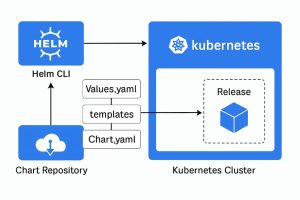
A Helm Chart is a collection of YAML templates and configuration files that define a Kubernetes application. A chart can be used to deploy something as small as a single microservice or as large as an entire cloud-native stack like Prometheus + Grafana.
Helm Chart Components:
-
Chart.yaml – Basic metadata (name, version, description)
-
values.yaml – Default configuration values
-
templates/ – The actual Kubernetes manifest templates
-
charts/ – Other dependent charts
-
README.md – Documentation for using the chart
3. Why Use Helm Charts in Kubernetes?
Here are the key benefits of using Helm Charts in Kubernetes:
-
Simplified Deployment – One command can deploy multiple Kubernetes resources.
-
Version Control – Charts are versioned, making rollbacks simple.
-
Parameterization – Override defaults in
values.yamlwithout editing templates. -
Reusability – Share charts with your team or via public repositories like Artifact Hub.
-
Faster CI/CD Pipelines – Integrates seamlessly with GitOps workflows.
Example:
Instead of running:
You can simply run:
4. Helm charts in kubernetes Architecture
Helm chart in kubernetes works in a client-server model:
-
Helm Client – The CLI tool you use to execute commands like
install,upgrade, orrollback. -
Kubernetes API Server – Helm communicates directly with it.
-
Chart Repository – Stores packaged Helm Charts (
.tgzfiles). -
Tiller (Helm v2 only) – A server-side component (removed in Helm v3 for security reasons).
With Helm v3, the client communicates directly with the Kubernetes API, making it simpler and more secure.
5. Helm Chart in kubernetes Directory Structure
When you create a Helm Chart using:
You’ll see a structure like this:
mychart/

├── Chart.yaml

├── values.yaml

├── charts/

├── templates/

│   ├── deployment.yaml

│   ├── service.yaml

│   └── _helpers.tpl

└── README.md
Explanation:
-
Chart.yaml → Defines metadata (name, version, etc.)
-
values.yaml → Default config values (can be overridden at install time)
-
templates/ → YAML templates using Go templating syntax
-
charts/ → Dependency charts
-
_helpers.tpl → Helper template functions
6. Creating a Helm Chart
Let’s create a simple Helm Chart for an Nginx web server.
Step 1: Create the Chart
Step 2: Edit values.yaml
Step 3: Install the Chart
Step 4: Verify Deployment
7. Deploying Helm Charts from a Repository
Instead of creating from scratch, you can install charts from Artifact Hub.
Example:
This command will deploy a MySQL database in Kubernetes with one line.
8. Upgrading and Rolling Back with Helm
Helm makes upgrades and rollbacks simple.
-
Upgrade:
-
Rollback:
9. Helm Chart Best Practices
-
Keep templates DRY – Use
_helpers.tplto store reusable template code. -
Version your charts – Always update
versioninChart.yaml. -
Separate values for environments – Use different
values-*.yamlfor dev, staging, prod. -
Document your chart – Include a clear
README.md. -
Test before deployment – Use
helm lintto validate chart syntax.
10. Real-World Use Cases for Helm Charts in Kubernetes
-
DevOps Pipelines – Automate deployments in CI/CD workflows.
-
Monitoring Stacks – Deploy Prometheus, Grafana, and Alertmanager in minutes.
-
Databases – Spin up MySQL, PostgreSQL, or MongoDB clusters quickly.
-
Service Mesh – Install Istio or Linked with a single Helm command.
11. Pros and Cons of Helm Charts in Kubernetes
Pros:
-
Simplifies complex deployments
-
Makes configuration reusable
-
Great for versioned releases
Cons:
-
Learning curve for Go templating
-
Overhead for very small deployments
-
Version compatibility issues in large teams
12. Conclusion
Helm Charts in kubernetes are a game-changer for Kubernetes application deployment. They provide a powerful, repeatable, and version-controlled way to manage even the most complex Kubernetes workloads. Whether you’re deploying a simple web app or an entire microservices ecosystem, Helm makes it easier, faster, and less error-prone.
“You can find more official Click here